

1. The Invisible Cost of Campaign Chaos
Here’s a truth most marketing teams don’t say out loud:
Campaigns don’t fail because people aren’t talented.
They fail because the digital assets behind them are a mess.
If you’ve ever opened a shared drive and found three versions of the same file—
Creative_Final_v2_FINAL(actual final).pptx
—Then you already know the problem.
But what we rarely do is measure the cost of this chaos.
Microsoft’s Work Trend Index revealed that 62% of professionals struggle to find information across fragmented sources.
Another study shows office workers spend 1.5 hours per week just renaming and reorganizing files.
And in fast-moving marketing teams, that number is exponentially higher.
Behind every scattered asset lies:
- A delayed campaign
- A missed opportunity
- And a frustrated team trying to guess which file is “correct.”
This isn’t a productivity issue.
It’s an information logistics issue.
An AI agent can solve this.
And today, that’s where the story begins.
2. The “Digital Warehouse” Analogy

Imagine your marketing team’s shared drive is a giant warehouse.
Except:
- None of the boxes have labels
- Some boxes are mislabeled
- Some contain old, irrelevant materials
- Some contain the one thing you need… but buried under 50 unrelated assets
Now imagine trying to run a global campaign while the warehouse looks like this.
E-commerce and CRM teams live in this warehouse every day.
Campaign performance isn’t slowed by creativity.
It’s slowed by file friction.
3. Where This Friction Actually Lives (Micro Pain Points)
Based on the R&D analysis we ran, here are the recurring patterns across CRM/Marketing & E-commerce companies:
A. Naming Variations Create Version Confusion
Files like:
- Banner-1024×1024-new
- Banner-1024×1024-FINAL
- Banner-(client-updated).png
Most of them are duplicates. One is correct. Nobody knows which.
B. Cross-team Handoffs Break
Sales → Marketing → Design → Product.
Assets get trapped in someone’s folder.
No one remembers where.
C. No Centralized Knowledge Layer
CRMs contain customer data.
Analytics platforms contain insights.
Shared drives contain creatives.
But no system connects them.
D. “Search” Rarely Works as Expected
Because metadata is missing.
Or inaccurate.
Or non-existent.
E. Review Cycles Take Longer Than Content Production
Finding who approved what becomes its own mini-search expedition.
4. The Global Trend That Changes Everything

We’re witnessing a global shift:
AI agents moving from “responding to prompts” → to “doing operational work.”
Gartner predicts that by 2027, 50% of GenAI-using companies will deploy intelligent agents to run business workflows.
Marketing is at the front of this shift.
Because marketing produces the largest volume of:
- Files
- Variations
- Revisions
- Assets
- Campaign materials
- Cross-channel collateral
This is why “Custom Copilot Agents for File Management” is not a nice-to-have.
It’s an early-mover advantage.
5. So… What Would a Copilot Agent Actually Do?
Here’s where it gets interesting.
A custom Copilot Agent — built for your CRM & marketing environment — can function like a smart warehouse manager that never sleeps.
Copilot Agent Superpowers
- Rename assets automatically based on campaign rules
- File version tracking
- Make duplicate detection and cleanup autonomous
- Centralize campaign assets across email, SharePoint, Dropbox, or Teams
- Search like a brain, not a folder
(“Show me the Black Friday hero banners approved by Sara last week.”)
- Auto-tag metadata
- Summarize large marketing reports
- Translate content for different markets
- Ensure compliance rules for brand assets are followed
This isn’t theoretical.
We already built similar structures in products like iPlanner Pro, which combined task automation + AI insight.
6. The Emotional Relief Factor
Ask any marketing manager what they wish they had more of:
Time?
Clarity?
Control?
Custom Copilot Agents bring all three because they eliminate the invisible load of files.
Marketing teams go from:
→ “Where is this file?”
to
→ “What should we create next?”
That’s the real transformation.
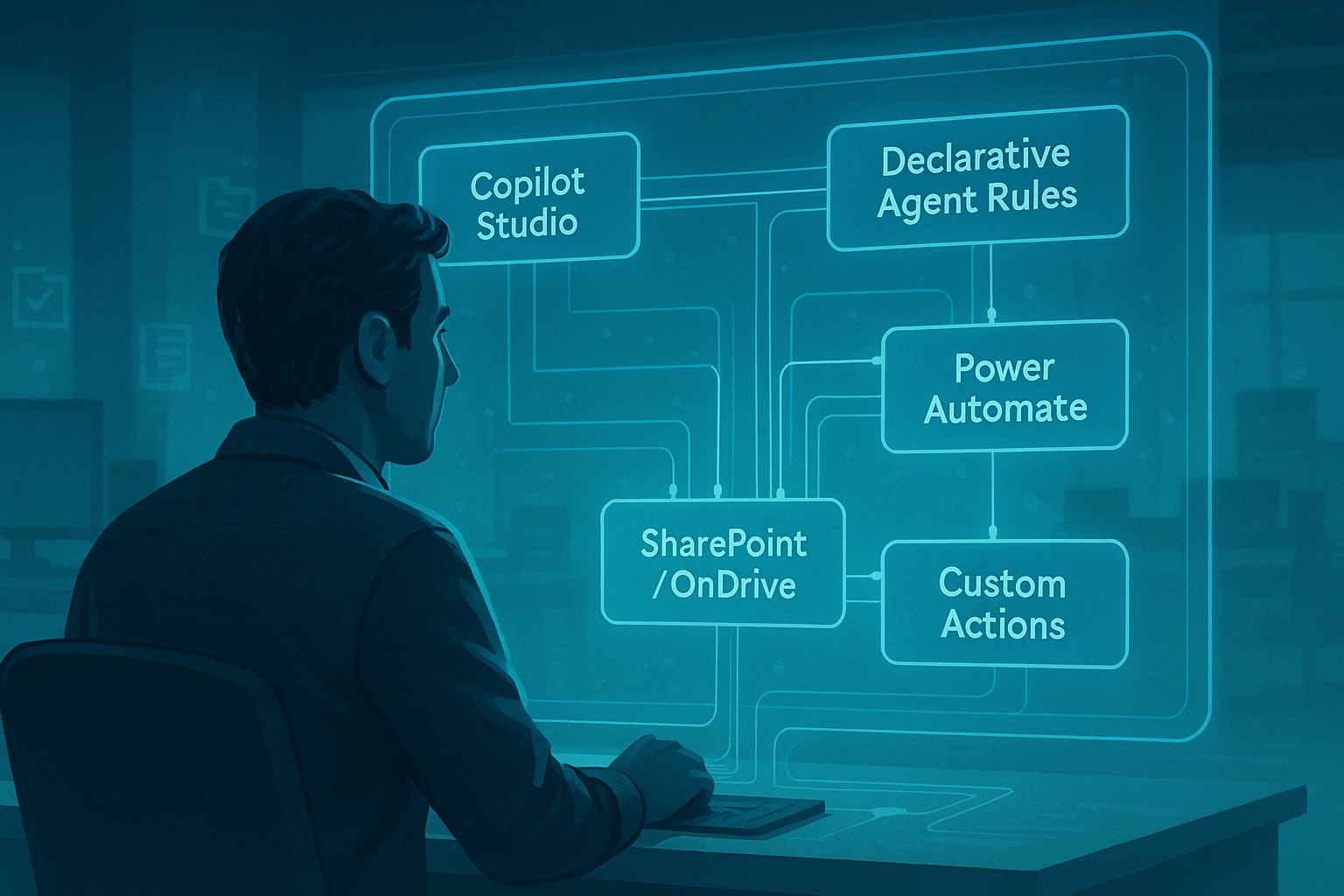
7. How to Build This — Technical Blueprint
Here’s the good news:
You don’t need to rebuild your marketing stack.
You just need to orchestrate it.
This is the part most teams overlook – the part where Copilot becomes useful rather than “another Artificial Intelligence thing we tried once.”
Below is the real, practical structure behind a functioning Copilot Agent for campaign operations.
A. Copilot Studio — Where the Agent Learns Your World
This is the control room.
Copilot Studio is where you:
- Tell the agent what it should understand
- Feed it your knowledge (brand rules, naming rules, guidelines)
- Plug it into your systems
It’s essentially training a smart assistant that actually knows your company, not just the internet.
B. Declarative Copilot Agent — The Rules Layer That Removes Guesswork
This is the “if this, then that” intelligence.
Here we define:
- How files should be renamed
- How versions should be recognized
- How duplicates should be detected
- How search should behave (“latest approved,” “most relevant,” “campaign-specific”)
It’s the difference between Copilot guessing… and Copilot knowing.
C. Power Automate — The trigger System That Does the Heavy Lifting
Some workflows shouldn’t wait for someone to ask.
They should run automatically.
Power Automate Handles that part.
It can:
- Trigger when a new file hits OneDrive/SharePoint
- Auto-tag assets as soon as they’re uploaded
- Kick off approval workflows
- Clean up duplicates on a schedule
- Route files to the right folders or reviewers
This is how your agent becomes proactive — not reactive.
D. SharePoint & OneDrive — The File Spine
This is where the truth lives.
It’s your warehouse
The agent uses these to:
- Search across everything
- Update metadata
- Move, classify, or rename files
- Track versions and approvals automatically
These storage systems finally become “smart,” instead of cluttered dumping grounds.
E. Custom Actions — For Everything That Lives Outside Microsoft
Because not everything is in the cloud.
And definitely not everything is in SharePoint.
Custom actions let Copilot reach:
- Local folders
- Legacy systems
- Third-party drives
- CRM exports
- Any custom API you expose
If your files exist, the agent can reach them.
F. How It All Works Together (The Simple Story)
Here’s what it looks like in real life:
- A new asset is uploaded → Power Automate catches it.
- Rules kick in → Declarative Agent checks naming, metadata, duplicates.
- Fixes are applied → The file is tagged, cleaned, and versioned.
- Someone asks, “Show me the final assets for Campaign X” →
Copilot Studio agent or Declarative Agent answers instantly with the correct, approved files.
No hunting.
No guessing.
No “final_FINAL_v3.”
G. Why This Blueprint Actually Works
Because it combines:
- Knowledge (Copilot Studio)
- Rules (Declarative Agent)
- Automation (Power Automate)
- Smart Storage (SharePoint/OneDrive)
- Flexibility (Custom actions for anything else)
This is how marketing teams finally escape the “digital warehouse chaos” and move toward clarity, speed, and control.
8. The Future Belongs to Companies Who Treat Files as Data
Files used to be static.
Now they are dynamic operational inputs.
Those who adopt Copilot Agents early will have a competitive content velocity advantage that becomes very hard to catch up with.
Because the competition won’t just be your creative team.
It will be your creative team plus an intelligent file-optimization agent working 24/7.
So, basically, file management is a business advantage, no matter which industry your business belongs to. And if your business is in the Microsoft ecosystem, we can provide u with a custom Copilot agent for ur file management. If not, then of course, with another agentic solution.
👉 Talk to Ixora Solution to understand how a tailored Microsoft Copilot Agent can bring structure, safety, and speed back into your healthcare workflows.

Add a Comment