

API performance can make or break user experience. When our Outlook add-in’s load times hit 24 seconds due to inefficient API calls, we knew drastic changes were needed. Here’s how strategic API design and caching cut our load time by 80%.
Background & Bottlenecks
Meet Odoo Ex: Our Outlook add-in Odoo Ex serves as a bridge between the Outlook client and the Odoo platform. It empowers users to manage opportunities, leads, tasks, and contacts directly from their Outlook interface. More importantly, it creates a streamlined way to leverage email content for collaboration within Odoo modules. With our core features already built, we needed to deploy on the server, integrate with the AppSource platform, and set up our SaaS offering.
Homepage Loading Issues
Here’s where things got interesting (and slow). When the add-in first loads with a user’s credentials, it needs to fetch all contacts, opportunities, leads, tasks, projects, and stages from Odoo. Our .NET Core server acts as a proxy during these interactions, simply redirecting user requests to the Odoo server.
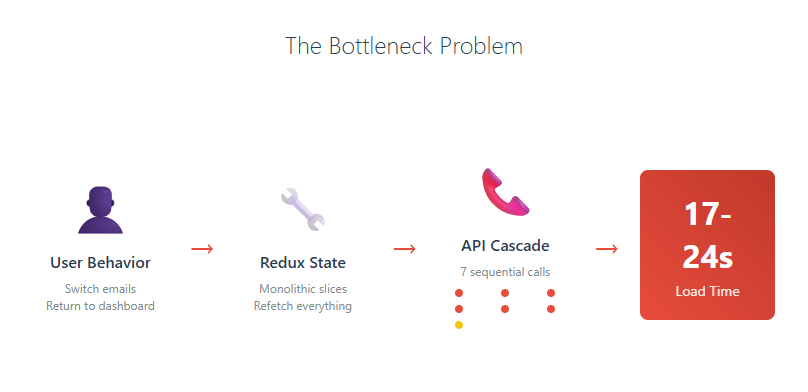
The bottleneck: We initially used one Redux state slice to handle all components (opportunities, leads, tasks, projects, and stages) and a separate slice for contacts. This meant that every time the application started, we fired off 6 API calls from frontend → backend → Odoo server. On top of that, we added another API call to Microsoft Graph API to verify user permissions for each operation.
The real pain point: Every time users returned to the home/dashboard page, all 6 API calls to Odoo were triggered again, plus the Microsoft Graph API verification call.
Given the nature of Outlook add-ins, users frequently switch between different emails and open/close the add-in for specific messages. This behavior created a perfect storm of performance issues, with load times consistently hitting 17-24 seconds – an eternity in user experience terms.
Strategic Approach
Individual UI States & Parallel API Calls
The insight: To render the homepage, we only actually needed opportunities, leads, and tasks. Contacts, projects, and stages could be loaded in the background (or lazy load) without blocking the initial render.
But we discovered another inefficiency – every time users returned to the homepage, we were fetching all lists again, regardless of whether anything had changed. This was wasteful. We only needed to refresh a module’s data if that specific module had updates, creations, or deletions.
The solution: Make each module’s state independent. Fetch leads only when leads change, opportunities only when opportunities change, and so on.
This required overhauling three layers:
- UI State: Restructured Redux to track individual module states
- Frontend API calls: Split into separate, parallel requests
- Backend APIs: Replaced our monolithic endpoint that made 6 sequential calls with individual endpoints for each module
The result: Our homepage now makes only 3 parallel API calls. More importantly, we track which modules have changes, so returning users only fetch updated data – not everything from scratch.
Tackling the License Check Bottleneck
Our license verification was another expensive operation, requiring calls to Microsoft Graph API to validate user subscriptions.
We evaluated four approaches:
Option 1: Dead Components
Create background React components to handle license checks asynchronously, preventing them from blocking regular add-in operations.
Option 2: Office Context Persistence
Store license expiry dates in Outlook’s office context during login, then check locally. However, this was less secure since users could potentially modify browser data.
Option 3: 24-Hour Check Intervals
Only verify licenses every 24 hours instead of on every interaction, caching the result between checks.
Option 4: Local Database Sync (Our Choice)
Store license information in our own database and check against that instead of hitting Graph API every time. A background job syncs with Microsoft’s database every 24 hours to catch any license changes.
This approach gave us the best of both worlds – fast local checks with reliable sync to Microsoft’s authoritative data.
Caching Strategy
While Redis would be an ideal caching solution for larger deployments, our application runs on a single server and only needs basic functionality – holding data in memory and invalidating it under specific conditions.
Enter IMemoryCache: .NET’s built-in caching feature was perfect for our needs, providing native in-memory data persistence without additional infrastructure complexity.
Our implementation: Whenever someone fetches lists of opportunities, leads, or tasks, we cache the results for 15 minutes. This dramatically reduces response times since we no longer need to hit the Odoo server for every request.
Smart invalidation: When users make changes to opportunities, leads, or tasks (editing, deleting, updating states, etc.), we immediately invalidate that specific cached list. This ensures users always see fresh data while maintaining the performance benefits of caching for unchanged content.
The beauty of this approach lies in its simplicity – we get significant performance gains with minimal infrastructure overhead and bulletproof data consistency.
Metrics & Key Takeaways
Performance Transformation
The numbers speak for themselves:
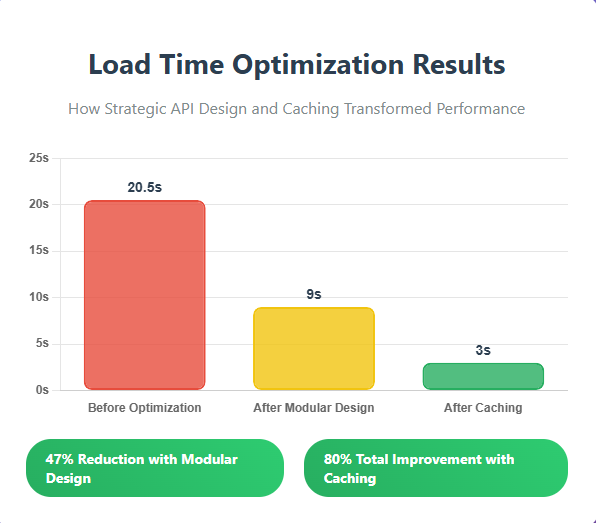
- Before: 17-24 seconds initial load time
- After modular refactoring: ~9 seconds (47% improvement)
- After caching implementation: ~3 seconds (80% overall improvement)
Key Takeaways
1. Don’t Fetch Everything Upfront
Loading only what’s immediately needed for the initial view can cut load times in half. Background loading of secondary data maintains functionality without blocking the user.
2. State Management Matters
Individual state slices prevent unnecessary re-fetching. Track what’s changed rather than refreshing everything on every page visit.
3. Simple Caching Wins Big
You don’t always need Redis or complex distributed caching. .NET’s built-in IMemoryCache delivered massive performance gains with minimal complexity.
4. License Checks Are Expensive
Moving authentication/authorization checks to background processes and local databases can eliminate major bottlenecks.
Conclusion
Experience the iXora Solution difference as your trusted offshore software development partner. We’re here to empower your vision with dedicated, extended, and remote software development teams. Our agile processes and tailored software development services optimize your projects, ensuring efficiency and success. At iXora Solution, we thrive in a dynamic team culture and experience innovation in the field of custom-made software development.
Have specific project requirements? Personalized or customized software solutions! You can contact iXora Solution expert teams for any consultation or coordination from here. We are committed to maximizing your business growth with our expertise as a custom software development and offshore solutions provider. Let’s make your goals a reality.
Thanks for your patience!

Add a Comment