Smart Template is an Outlook add-in that helps users create and manage email templates for faster, professional communication.
When users asked for AI-generated templates, we chose a hybrid approach:
OpenAI: High-quality results using GPT-4’s cloud API with zero infrastructure overhead.
Ollama: Complete ownership for customization—fine-tuning models for specific business scenarios, industry language, company voice, and data privacy. This is our strategic choice for building specialized capabilities.
We built a Node.js proxy that handles both providers, streaming responses in real-time and normalizing different formats. One codebase, maximum flexibility.
This article covers the proxy architecture, Server-Sent Events for streaming, response format normalization, and tradeoffs in Outlook add-ins.
Architecture Overview
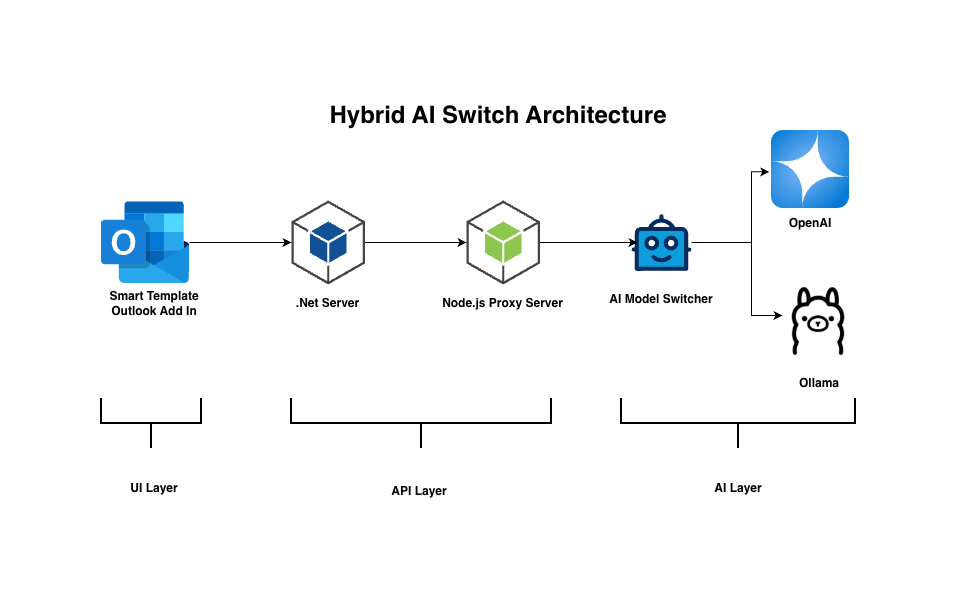
Our hybrid AI system has three components:
Outlook Add-in (Frontend): JavaScript-based UI where users compose emails and request AI-generated templates. Sends requests and displays streaming responses in real-time.
Transforms different response formats into a unified structure
Manages CORS, SSL, and environment configuration
AI Providers
OpenAI API (cloud): GPT-4o-mini for premium quality
Ollama (on-premise): Tinyllama for a customizable, owned solution
Data Flow
User request → Outlook Add-in → Proxy Server → [OpenAI or Ollama] → Stream response → Transform format → Display in real-time
The proxy abstracts provider differences, allowing the frontend to remain unchanged regardless of which AI service handles the request. This separation enables independent scaling, provider switching, and format normalization without UI modifications.
The Proxy Pattern
The proxy server is the core of our hybrid architecture. It solves a key problem: How do we support multiple AI providers without duplicating code or complicating the frontend?
Why a proxy instead of direct API calls?
Provider abstraction: The frontend sends one request format. The proxy handles provider-specific details—different endpoints, authentication methods, and request structures.
Security: API keys stay on the server, never exposed to the client. This is critical for OpenAI’s paid API.
Format normalization: OpenAI and Ollama return streaming data in different formats. The proxy transforms both into a unified structure that the frontend expects.
Flexibility: Adding new providers (Anthropic, Cohere, etc.) requires only server-side changes. The frontend code remains untouched.
Future Access control: The proxy architecture positions us to add granular permission management. We plan to build admin panel controls that determine which users can access which providers—premium subscribers get OpenAI, while others use our custom model. This business logic will live entirely in the proxy layer.
The proxy examines the provider parameter and routes accordingly. Each handler manages its provider’s specific streaming format and transforms the response.
Server-Sent Events (SSE) for Streaming
Real-time AI responses are critical for good user experience. Nobody wants to wait 10-15 seconds staring at a blank screen while the AI composes an entire email. Users need to see text appearing character-by-character, like ChatGPT.
Why Server-Sent Events?
One-way communication: Server pushes data to client (no need for client to send ongoing updates)
Built on HTTP: Works through firewalls, proxies, and corporate networks without special configuration
Simpler than WebSockets: No connection upgrade protocol, easier to implement
Native browser support: No additional libraries needed on the frontend
How it works:
Both OpenAI and Ollama support streaming responses. The proxy receives chunks of text as they’re generated and immediately forwards them to the client:
{"response":"Hello"}
{"response":" world"}
{"done":true}Code language:JSON / JSON with Comments(json)
If we sent these different formats directly to the frontend, we’d need two separate UI implementations—one for each provider. That defeats the purpose of the hybrid system.
Solution: Transform to unified format
The proxy normalizes both providers to output the same structure:
// OpenAI handler - extract and transformfor await (const chunk of stream) {
const content = chunk.choices[0]?.delta?.content;
if (content) {
const unified = JSON.stringify({ response: content }) + '\n';
res.write(unified);
}
}
// Ollama handler - pass through (already correct format)const reader = ollamaResponse.body.getReader();
while (true) {
const { done, value } = await reader.read();
if (done) break;
res.write(value); // Already in correct format
}Code language:JavaScript(javascript)
Result: The frontend receives an identical streaming format regardless of the provider. No conditional logic, no provider-specific code—just one streaming parser that works for both.
Performance & Flexibility Considerations
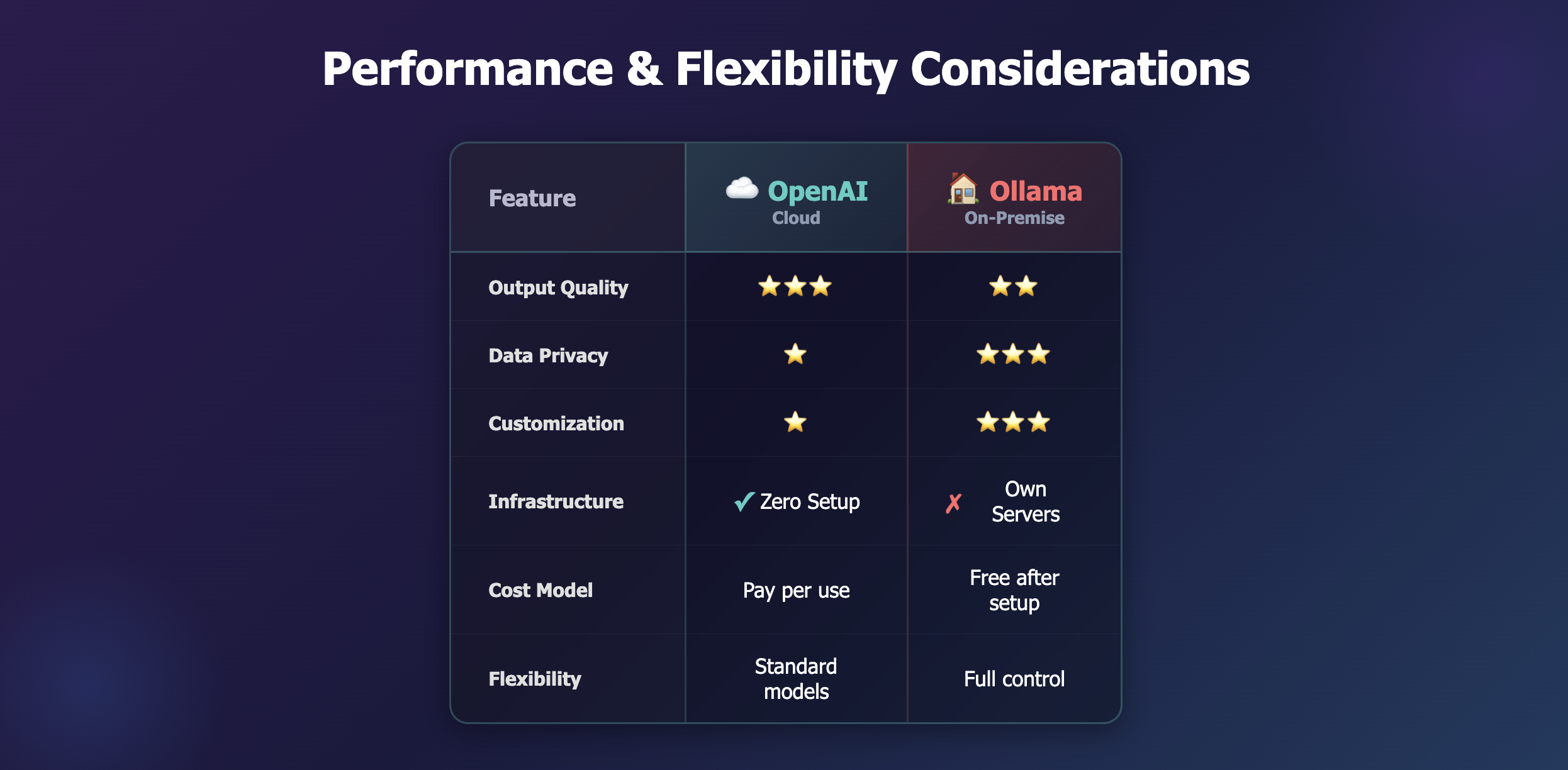
Both AI providers serve different needs.
OpenAI (Cloud): Superior output quality with GPT-4o-mini. Zero infrastructure overhead and always up-to-date. Requires internet connectivity and has per-request costs (~$0.15-$0.60 per 1,000 tokens).
Ollama (On-Premise): Complete ownership enables deep customization—fine-tuning for specific business scenarios, industry-specific language, company voice patterns, and tone variations. Works on our own server, ensures complete data privacy, and gives us full control over the AI pipeline. Strategic choice for long-term flexibility and specialized capabilities.
Our approach: OpenAI delivers excellent, consistent results out-of-the-box. Ollama provides the foundation for building custom, domain-specific AI tailored to different industries and use cases. The proxy architecture lets us route intelligently based on requirements and evolve our strategy without frontend changes.
For organizations with strict data policies, we can deploy the entire system on-premises using only Ollama.
Conclusion
Building a hybrid AI system for Smart Template taught us that flexibility beats picking the “right” provider. The proxy architecture and Server-Sent Events give us one unified interface that supports multiple AI providers. OpenAI delivers quality today. Ollama gives us ownership and customization for tomorrow. The proxy lets us use both intelligently without frontend changes. As AI evolves, this architecture lets us experiment with new providers, fine-tune for specific industries, and maintain control—all while keeping the code simple and the user experience seamless.
Looking to add AI capabilities to your productivity tools? Talk to iXora Solution about building customizable, hybrid AI systems


Add a Comment